
You have a critical server that absolutely cannot go down. You bought a good UPS, but now you worry: what if the UPS itself fails? This single point of failure is a big risk.
Yes, you can use two or more UPS systems to power the same device for redundancy. This is called a parallel configuration, and it ensures that if one UPS fails, the other instantly takes over the full load.
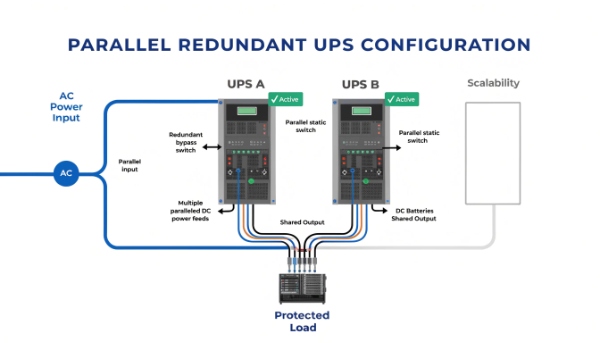
This is a question I get from system integrators who manage very valuable equipment. In my experience, for most situations, one properly sized UPS is enough. However, when the cost of downtime is extremely high—like in a hospital or a data center—we have to eliminate every single point of failure. The insight I always share is that if the load is that critical, a parallel system is the best insurance policy you can buy. If any single UPS unit fails, the others continue working without missing a beat. It's the ultimate level of protection.
Are inverters and UPS the same?
You see the terms "inverter" and "UPS" used for backup power. This is confusing, and you might buy one thinking it does the job of the other, leaving your equipment unprotected.
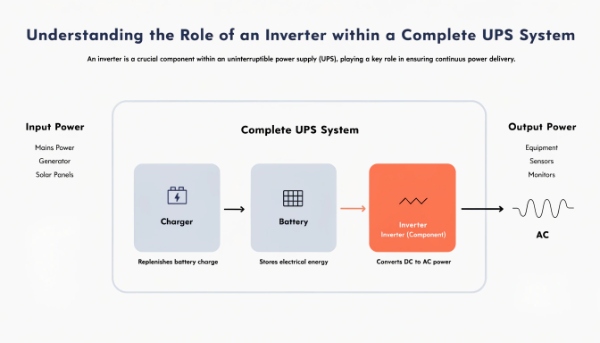
No, they are not the same. An inverter is a single component that converts DC power to AC power. A UPS is a complete system that includes a battery, a charger, and an inverter to provide backup power.
The Car and the Engine
I often use a simple analogy to explain this to clients. Thinking an inverter is the same as a UPS is like thinking a car engine is the same as a car. You need the engine for the car to work, but you can't drive down the road on an engine alone. You also need wheels, a chassis, and a steering wheel.
What is an Inverter?
An inverter has one specific job: it takes direct current (DC) from a source like a battery and turns it into alternating current (AC), which is the type of power that comes from your wall outlet. You see standalone inverters used in cars or with solar panel systems.
What is a UPS?
A UPS is the whole car. It's a complete, intelligent system designed for one purpose: to provide clean, uninterruptible power. It contains three key parts that work together seamlessly:
- The Charger: Takes AC power from the wall to charge the battery.
- The Battery: Stores the power as DC energy.
- The Inverter: Converts the battery's DC power back to AC power for your equipment during an outage.
A UPS manages this entire process automatically, switching to the battery in milliseconds. An inverter alone cannot do this.
Is UPS the same as a generator?
A power outage hits, and you need to keep things running for hours. You wonder if a UPS is enough, or if you should have bought a generator instead. This uncertainty is risky.
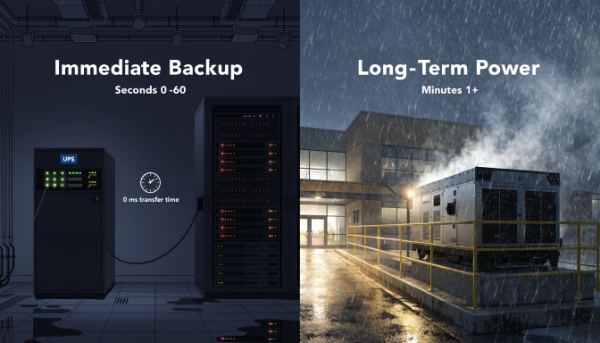
No, a UPS and a generator have very different jobs. A UPS provides instant, short-term power from a battery. A generator provides long-term power by burning fuel, but it takes time to start up.
The Perfect Power Team
You shouldn't think of it as UPS or generator; you should think of them as a team that works together to provide complete power protection. They cover each other's weaknesses.
The UPS: The Sprinter
The UPS is a sprinter. Its job is to react instantly. The moment the power cuts, its battery takes over with zero delay. This is critical because even a fraction of a second of power loss will crash a computer or server. However, the UPS battery has a limited runtime, usually just a few minutes to an hour. Its goal is to bridge the immediate gap.
The Generator: The Marathon Runner
The generator is a marathon runner. It can run for hours or even days, as long as it has fuel. But it's not fast. It needs time—from a few seconds to a minute—to start up and stabilize before it can take the load. This delay is too long for sensitive electronics.
Here is how they work together:
- Power Fails: The main utility power goes out.
- UPS Takes Over: Instantly, the UPS switches to battery power. All connected equipment continues to run without interruption.
- Generator Starts: The generator detects the outage and begins its startup sequence.
- Power is Transferred: Once the generator is running smoothly, the power load is transferred from the UPS to the generator.
- UPS Recharges: The UPS now uses power from the generator to recharge its own battery, getting ready for the next outage.
What is the best way to use a UPS for home backup power?
You want to keep your internet and computer running during an outage. But home UPS options are confusing, and you might not know what to plug in or how long it will last.
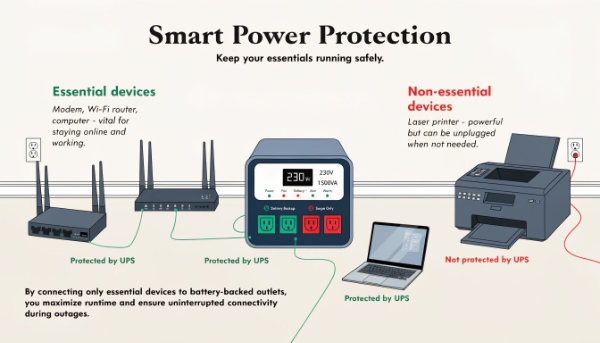
The best way is to identify your most essential devices, like your modem, Wi-Fi router, and laptop. Connect only these to a simple Line-Interactive UPS to maximize your backup runtime for communication.
Smart Home Backup Strategy
For home use, you don't need a massive system. The goal is strategic protection. As a manufacturer, we make small units perfect for this job. The key is to be selective about what you protect.
Step 1: Identify Critical Devices
Don't try to back up your whole house. Focus on what keeps you connected and productive. This usually means three things:
- Your Modem: The device that brings the internet into your home.
- Your Wi-Fi Router: The device that shares the internet with your devices.
- Your Computer/Laptop: So you can save your work and communicate.
These devices use very little power, so a small, affordable UPS can keep them running for a surprisingly long time. Avoid plugging in high-power devices like laser printers or space heaters, as they will drain the battery almost instantly.
Step 2: Calculate Runtime
Once you know what you're plugging in, look at the UPS specifications. A typical home UPS might provide 30-60 minutes of runtime for a modem and router. This gives you plenty of time to finish an important email, make an online call, or just stay informed during the outage. Remember that runtime is a direct trade-off with load; the more you plug in, the shorter it lasts.
What are the key features of modern UPS systems?
You need to source a reliable UPS for a project. But technology has changed, and you're not sure what features separate a basic, outdated unit from a modern, high-performance one.
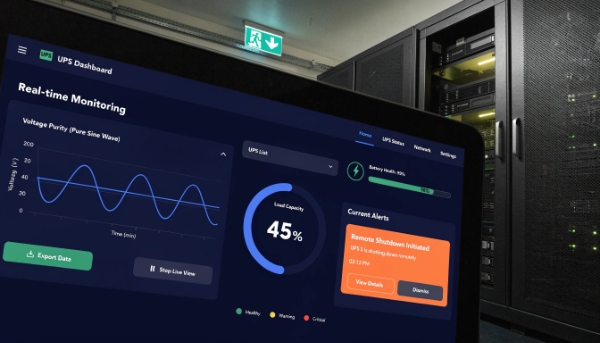
Key features of modern UPS systems include pure sine wave output for compatibility, advanced battery management for longer life, network connectivity for remote monitoring, and support for high-efficiency lithium-ion batteries.
Beyond Just Backup
As an OEM/ODM partner, we focus on building UPS systems with features that our clients, like procurement managers and system integrators, truly need. A modern UPS does much more than just provide backup power.
1. Output Waveform
This is a critical technical detail. The best UPS systems produce a "pure sine wave" output, which is an exact replica of the clean power from a utility. This is essential for sensitive electronics and equipment with AC motors. Cheaper units use a "simulated sine wave," which can cause problems for some modern devices.
2. Smart Battery Management
The battery is the heart of the UPS. Modern systems use advanced charging technology that extends battery life, saving money over time. They perform automatic self-tests and provide an accurate estimate of the remaining runtime, so you are never caught by surprise.
3. Connectivity and Software
The ability to manage the UPS remotely is a huge benefit. Our systems offer USB and network ports (using an SNMP card) that allow you to monitor status, get alerts, and configure automated shutdowns from anywhere. This is a must-have for managing multiple locations.
4. Lithium-ion Battery Support
While lead-acid is the traditional choice, we specialize in developing UPS systems with lithium-ion batteries. They offer a much longer lifespan (8-10 years vs. 3-5), are smaller and lighter, and recharge faster. This makes them a great long-term investment.
Conclusion
You can use multiple UPSes for redundancy on critical devices. It's crucial to understand that a UPS is a complete system, unlike an inverter, and works with a generator for total protection.
