
You need to buy a UPS, but the sizing feels like guesswork. If you buy one that's too small, your whole system will crash. If you buy one that's too big, you've wasted thousands of dollars.
To size a UPS correctly, add up the total wattage of all the equipment you need to protect. Then, add a 25% buffer to that total. This final number is the minimum power capacity in Watts your UPS must have.
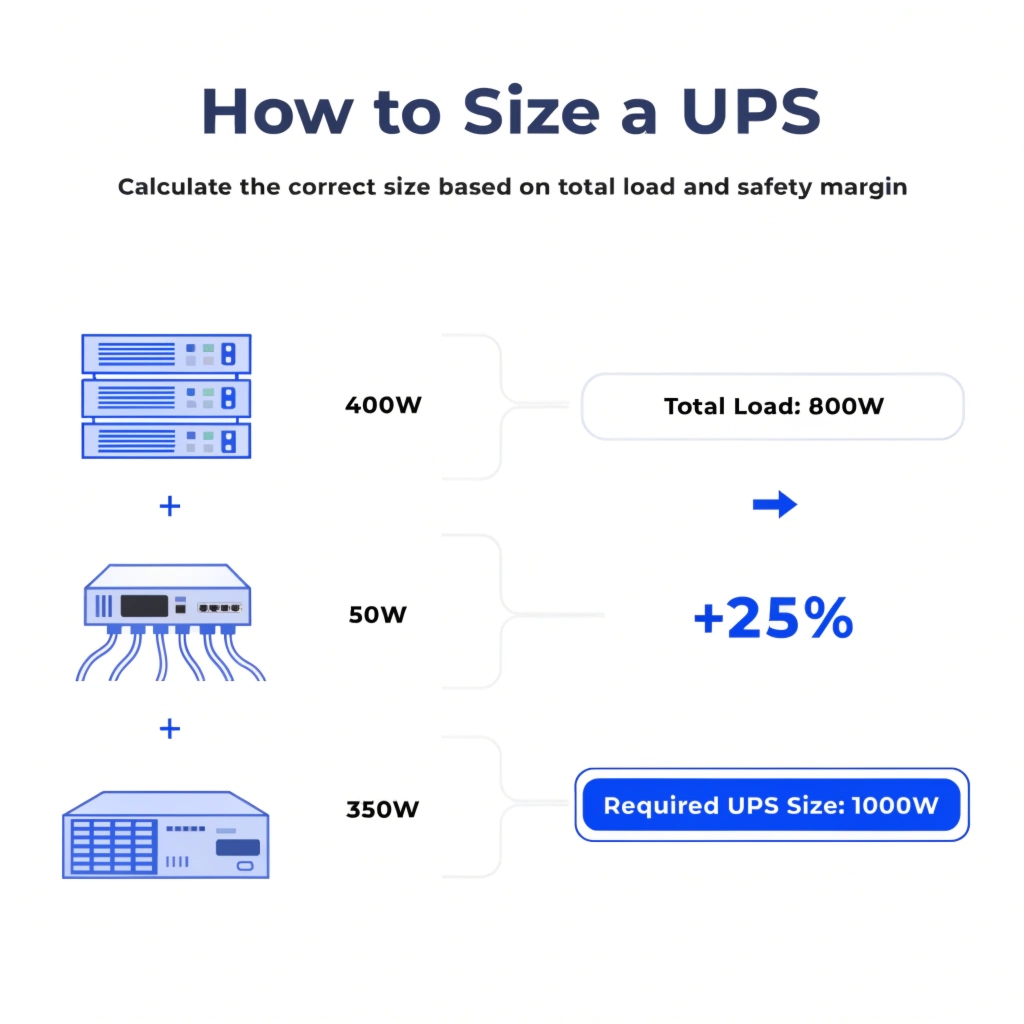
As a manufacturer with over a decade of experience, I've seen this question cause more confusion than any other. People get lost in specs like Volt-Amps (VA) and Power Factor. But it doesn't have to be complicated. The most important number is Watts because that's what your equipment actually uses. Starting with a simple wattage calculation ensures you are buying exactly what you need for today, with a safe margin for tomorrow. This first step is the key to building a reliable and cost-effective power protection plan.
How to Choose a UPS (Uninterruptible Power Supplies)?
You've calculated the power you need. But now you face more choices: different technologies, runtimes, and shapes. The wrong choice here can still lead to system failure or wasted money, even with the right power size.
After sizing for power in Watts, you choose a UPS by selecting the right technology (Online for critical loads), the necessary runtime (5-15 minutes to bridge to a generator), and the correct physical form factor (rackmount or tower).
%[A side-by-side photo comparing a sleek rackmount UPS inside a server rack and a standalone tower UPS](https://libatteryhub.com/wp-content/uploads/2026/04/choosing-between-rackmount-and-tower-ups-instruct.jpg"Choosing Between Rackmount and Tower UPS")
Beyond the Watts
Getting the power rating right is just step one. As an OEM, we build different types of UPS systems because different situations have different needs. A procurement manager needs to match the UPS features to the value of the equipment it protects.
First, there's the technology. For a data center or critical server, you must use an Online Double-Conversion UPS. This type completely rebuilds the power from the grid, providing a perfect, clean output with zero transfer time. It's the ultimate protection.
Next is runtime. How long does the UPS need to run on batteries? The goal is not to run for hours. The goal is to provide a 5-to-15-minute bridge. This gives your backup generator time to start or allows your systems to shut down safely. You can add External Battery Modules (EBMs) to increase this time if needed.
Finally, consider the form factor. Most data center equipment fits in standard 19-inch racks. A rackmount UPS is designed to fit right in with your servers. A tower UPS is a standalone unit, better for network closets or office environments.
| Decision Point | Option 1 | Option 2 | Why it Matters |
|---|---|---|---|
| Technology | Line-Interactive | Online Double-Conversion | Online provides the highest level of protection with zero transfer time for servers. |
| Runtime | 5-15 Minutes | 1+ Hour | Sizing for a short bridge to a generator is the most cost-effective strategy. |
| Form Factor | Rackmount | Tower | Rackmount units integrate cleanly into standard data center server racks. |
What is the output power of a UPS, AC or DC?
You see "AC" and "DC" in the technical specs. You know servers have internal power supplies. This can make you wonder if the UPS output is directly compatible with your sensitive IT equipment.
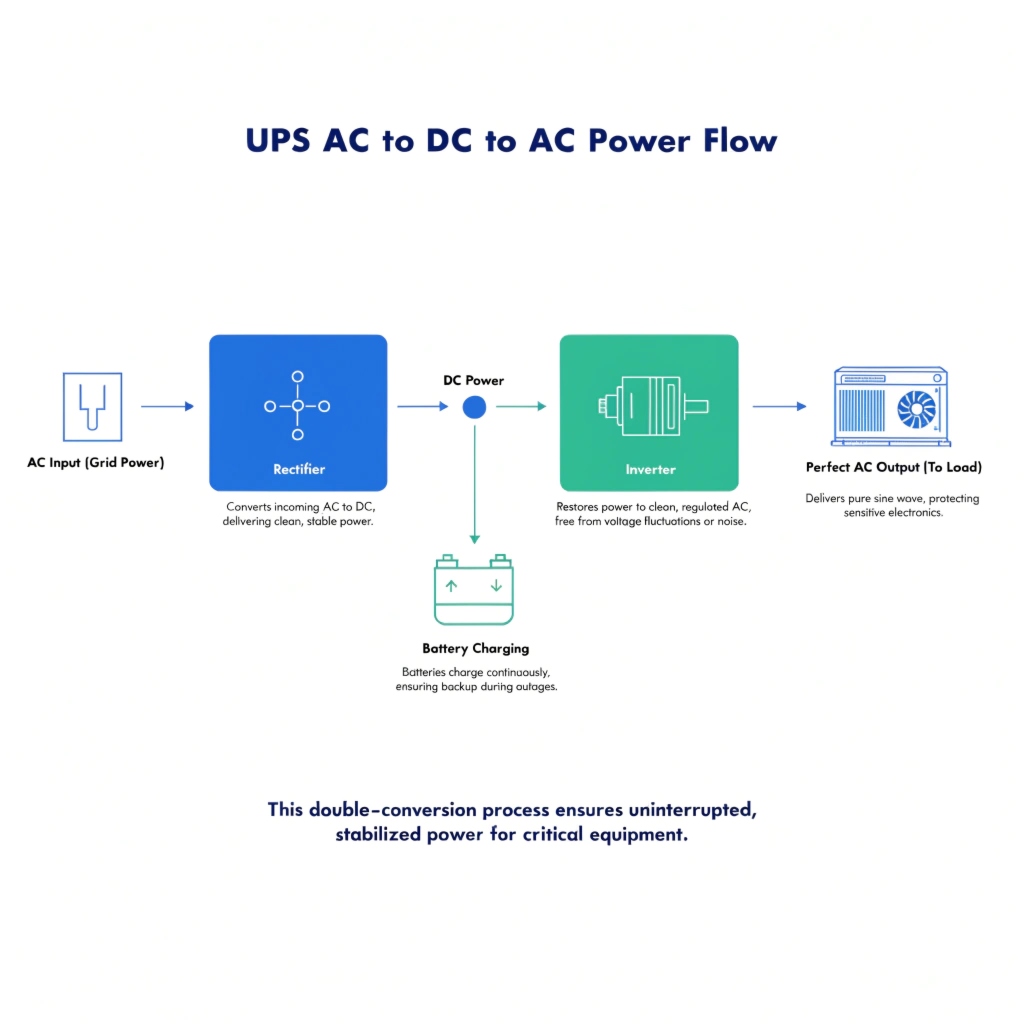
A standard UPS always outputs AC (Alternating Current) power, just like a wall outlet. It takes AC power in, uses DC (Direct Current) internally for its batteries, but then converts it back to pure AC for your servers.
The Double-Conversion Journey
This AC-to-DC-to-AC process is the heart of an Online UPS. It's why we call it "Double-Conversion," and it's what guarantees your equipment gets perfect power. Let me break it down simply.
First, the "Rectifier" stage takes the incoming AC power from your wall. This power is often messy, with small sags and surges. The rectifier converts it into clean, stable DC power. This DC power does two things at once: it keeps the batteries fully charged, and it feeds the next stage.
The second stage is the "Inverter." The inverter takes that smooth DC power and uses it to build a brand new, perfect AC electrical signal from scratch. Your servers are always running on this perfect, inverter-created power. When the wall power fails, the inverter doesn't even notice. It just starts drawing its DC power from the batteries instead of the rectifier. Because the inverter is always on and always creating the output, the transfer time is zero. This process ensures total protection for your critical systems.
What is the power source for a UPS?
You plug your UPS into the wall. So, the wall is the power source, right? But during a blackout, the wall outlet is dead. This raises a key question about how a UPS actually functions.
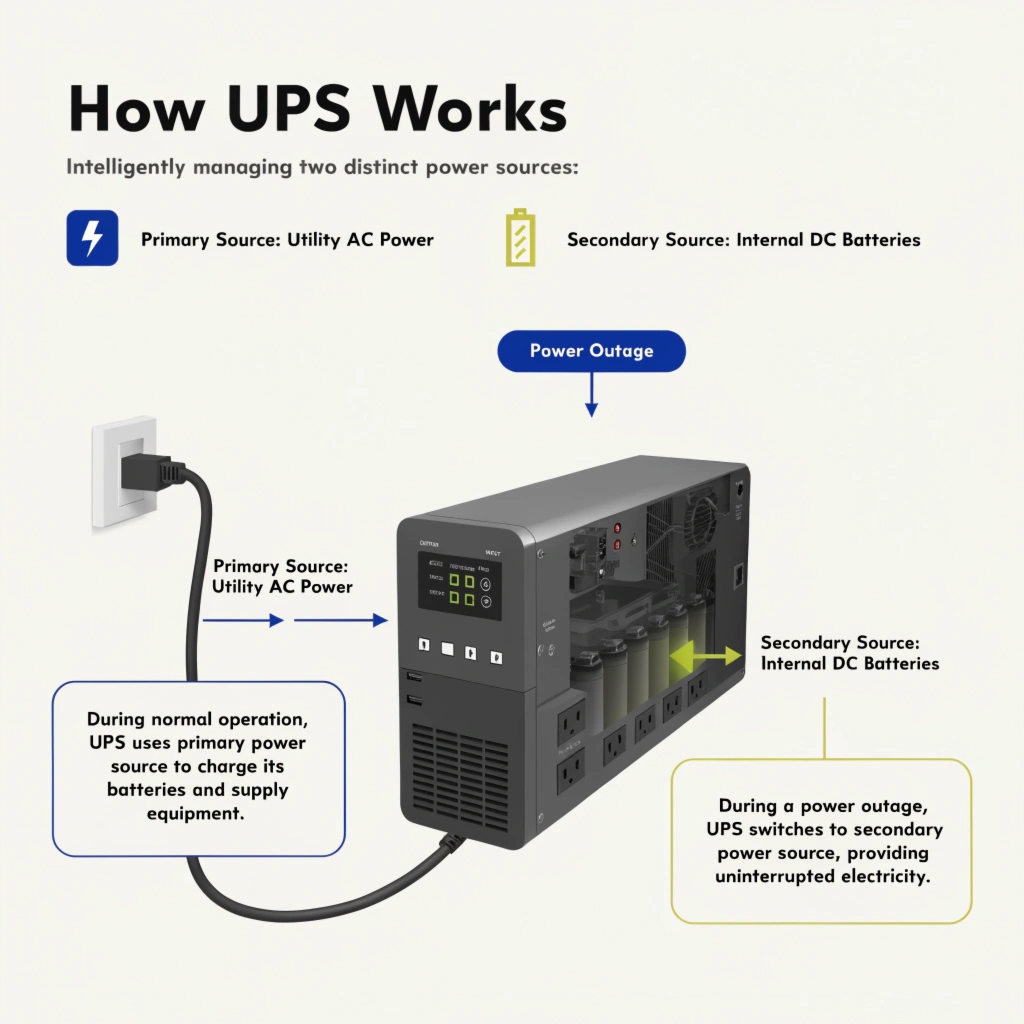
A UPS has two power sources. Its primary source is the main utility power from the wall (AC). When that fails, it instantly switches to its secondary source: its internal bank of batteries (DC).
Managing Multiple Power Inputs
My key insight for you is that choosing the right UPS is important because it is a smart device designed to manage multiple power sources. The grid, batteries, and even external energy storage packs can all supply power to the UPS.
In normal operation, day-to-day, the UPS runs on utility power. It draws AC electricity from your building, uses it to power your servers, and also keeps its internal batteries charged and ready. This is its primary mode.
The moment the utility power fails, the UPS's internal logic switches its input source. It stops drawing from the dead AC line and instantly starts drawing from its secondary source, the DC batteries. The inverter continues to create perfect AC output, so your equipment never knows the grid is down. The amount of stored energy in these batteries dictates the runtime. This is why we sometimes add External Battery Modules (EBMs) or larger energy storage packs—they are simply an extension of this secondary power source to provide longer runtime. The UPS is the intelligent hub that makes this transition seamless and automatic.
Conclusion
To get the right UPS, calculate your total equipment wattage and add a 25% buffer. For critical systems, always choose an Online model that outputs clean AC power from utility or battery sources.

