
Buying a UPS seems complicated with all the specs like volts, watts, and VA. You worry that if you make the wrong choice, you will either damage your expensive equipment or waste your company's budget.
First, add up the total wattage of all devices you need to protect. Choose a UPS with a Watt rating at least 25% higher than your total. Then, simply plug the UPS into the wall and your devices into the UPS.
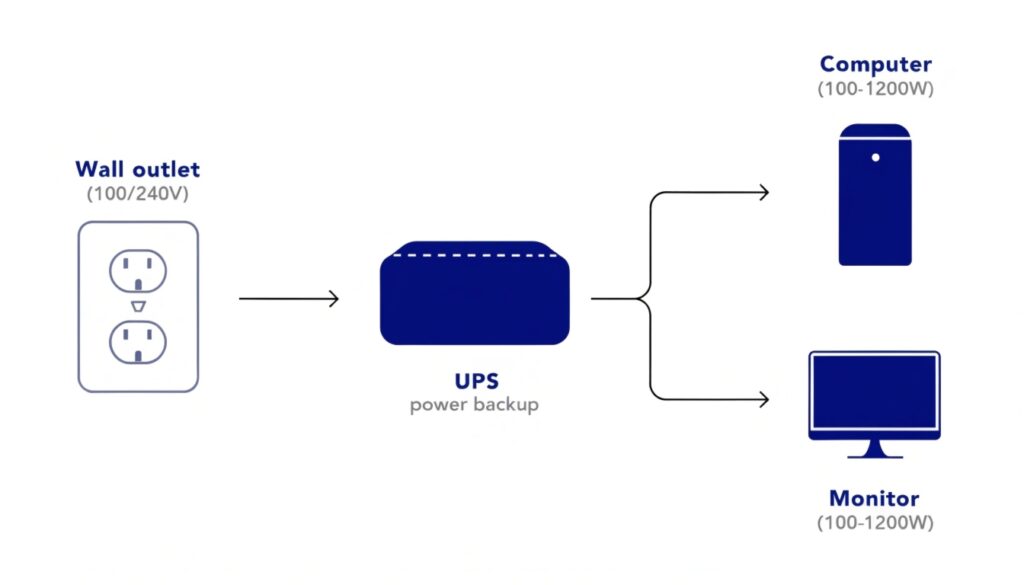
As a UPS manufacturer for over 10 years, I've learned that installation is the easy part. My insight is that setting up a UPS is very convenient: you just connect it to power and then connect your load. The real challenge for procurement managers is selecting the right unit from the start. People often suggest buying a UPS that is twice the size of your load. While that is a very safe approach, a more precise calculation can save you a lot of money. Let's break down the key factors so you can buy and use your UPS with confidence.
What is the voltage of the UPS?
You see different voltages listed: 120V, 220V, 230V. You know that picking the wrong one could be a disaster for your project, potentially frying the UPS or the devices it's meant to protect.
The UPS voltage must match the standard wall outlet voltage of your country or region. For example, use a 120V UPS in North America and a 230V UPS in most of Europe and Asia.

Matching Power to Place
As an OEM/ODM manufacturer, a huge part of our job is building UPS systems for clients all over the world. The number one rule is that the UPS's nominal voltage must match the local power grid. If you plug a 120V UPS into a 230V outlet, you will destroy it instantly.
The output voltage of the UPS will also match this standard. A 230V UPS will provide a clean 230V output to your equipment. This is critical because your servers, computers, and network switches are all designed to run on the voltage specific to their region. While some modern power supplies in IT gear are "universal" and can accept a wide range of voltages, you should never rely on that. You must purchase a UPS designed for your specific location to ensure safety and proper operation. For our international clients, we customize everything from the internal transformer to the type of outlet plugs on the back of the unit.
| Region | Standard Voltage | Common Plug Type |
|---|---|---|
| North America, Japan | 100V - 120V | NEMA 5-15 |
| Europe, Asia, Africa | 220V - 240V | Schuko, UK Type G, IEC C13 |
| Australia, New Zealand | 230V | AS/NZS 3112 |
Can I use 1200VA UPS to my 850W PSU and a monitor?
You see a big "1200VA" number on a UPS box and think it must be powerful. But you also see the 850W rating on your PC's power supply, and you are not sure if they are compatible.
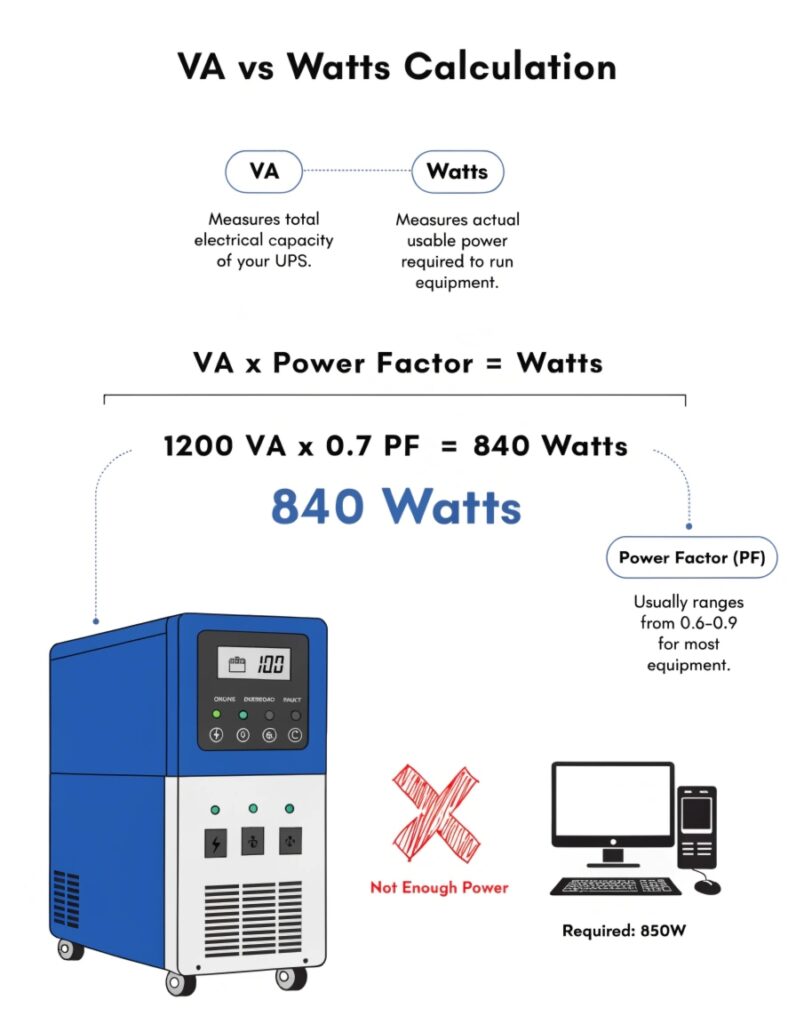
No, a 1200VA UPS is almost certainly not enough for an 850W load. You must compare the Watt rating of the UPS to the Watt rating of your devices, not the VA number.
The Difference Between VA and Watts
This is the single most common point of confusion when buying a UPS. Let me make it very simple. Watts (W) is the real power your equipment actually draws from the wall to do work. Volt-Amps (VA) is the "apparent power," which is the voltage multiplied by the current drawn by the UPS. Because of how power supplies work, the VA number is always higher than the Watt number.
The ratio between them is called the Power Factor (PF).
Watts = VA * Power Factor
Most consumer-grade UPS systems have a power factor between 0.6 and 0.8. A professional-grade UPS will have a PF of 0.9 or even 1.0. So, a 1200VA UPS with a 0.7 PF can only deliver 1200 * 0.7 = 840 Watts.
Your PC's power supply is 850W, and your monitor might use another 30-50W. Your total load is over 900W. The 840W UPS would be overloaded and would shut down immediately during a power outage.
A safe rule is to add up your total Watts and then add a 25% buffer for safety and future expansion.
900W Load * 1.25 = 1125W.
You need a UPS with a minimum output rating of 1125 Watts.
Can you daisy chain two or more UPSs together?
You need more battery runtime or more outlets than your single UPS can provide. You think, "I'll just plug a second UPS into the first one." This seems like a simple solution to expand your system.
No, you must never connect the output of one UPS to the input of another. This is called "daisy-chaining" and it is dangerous. It can cause overloads, reduce efficiency, and will void your warranty.

The Right Way to Expand
As an engineer, I can tell you that daisy-chaining creates a feedback loop that UPS systems are not designed to handle. The first UPS has to power the second UPS's battery charger, which is an unstable and inefficient type of load. This can cause the first UPS to overload. Furthermore, the power output from the first UPS, especially a less expensive model, might not be a perfect sine wave. This "dirty" power can damage the charging circuitry of the second UPS. You are creating more problems and more points of failure, not more reliability.
There are safe, engineered solutions for expansion:
- For More Runtime: Purchase an External Battery Module (EBM). These are designed by the manufacturer to safely connect to your specific UPS model. They simply add more battery capacity under the control of the primary UPS.
- For More Outlets: Use a basic Power Distribution Unit (PDU) or a simple power strip. Plug the PDU into one of the UPS outlets. This allows you to safely connect more devices, as long as you do not exceed the total Watt rating of the UPS. Make sure the PDU does not have its own surge protection, as this can interfere with the UPS output.
Can we use a desktop UPS for laptops?
You want to keep your laptop and its connection safe during a power outage. You have a desktop UPS available, but you wonder if it is necessary or even safe for your laptop's internal battery.
Yes, you can use a UPS for a laptop, and it's perfectly safe. However, the main benefit isn't for the laptop itself, but for powering your network equipment like your Wi-Fi router and modem.

Protecting Your Connection, Not Just Your Computer
A laptop already has a built-in UPS: its own battery. When you unplug a laptop from the wall, it keeps running without interruption. Plugging it into a UPS is redundant for battery backup. The only direct benefit for the laptop is that the UPS provides superior surge protection for its power adapter compared to a basic power strip.
However, the real power of using a UPS with a laptop comes from keeping your internet connection alive. During a power outage, your laptop's battery will keep it running, but your internet will die because your modem and Wi-Fi router have lost power. By plugging your modem and router into the UPS, you can maintain your internet connection and continue to work, send emails, or finish your video call. For a remote worker or a small office, this is the most important function of the UPS. It turns a power outage from a complete work stoppage into a minor inconvenience. It ensures total continuity for the modern worker.
Conclusion
To buy and use a UPS correctly, first size it based on your load in Watts plus a 25% buffer. Match the voltage to your region, and simply connect it between the wall and your devices.
