
You need the best power protection for a critical server. You hear "Online UPS" is the top choice, but it's also the most expensive. You need to justify the cost.
An Online UPS continuously converts incoming AC power to DC, then back to perfectly clean AC power. Your equipment is completely isolated from the raw utility grid, receiving a pure, regenerated power signal with zero transfer time to the battery.
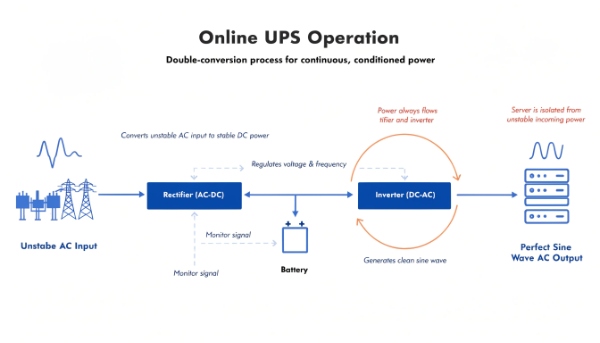
I always tell my clients, especially those in healthcare or finance, to think of an Online UPS not as a backup, but as a personal, miniature power station for their most critical equipment. While other UPS types react to power problems, an Online UPS prevents them from ever reaching your gear in the first place. It is a proactive defense. This is why for applications where downtime is not an option, we exclusively design and manufacture Online Double-Conversion solutions.
How long does an uninterruptible power supply last?
You are planning a budget for infrastructure. You need to know if a UPS is a short-term expense that needs frequent replacement, or a long-term capital investment for your facility.
A UPS unit's hardware can last 10-15 years with proper maintenance. However, its internal batteries are consumable and typically need replacement every 3-5 years (for lead-acid) or 8-10 years (for lithium-ion).
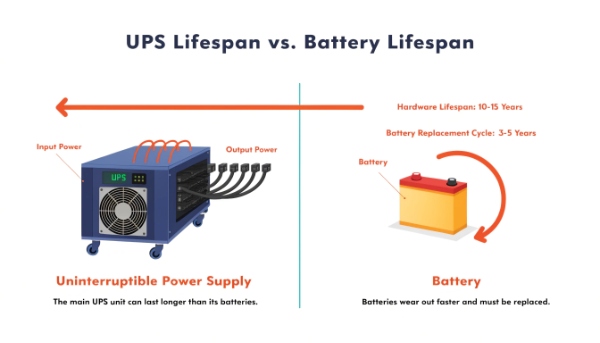
The Unit's Lifespan vs. Its Runtime
This question has two very different answers, and I make sure every procurement manager understands the distinction. We are talking about two separate things: the lifespan of the machine itself, and the runtime it can provide during an outage.
1. The Lifespan of the Hardware
The physical UPS "box" – the inverter, charger, and circuitry – is a robust piece of equipment. We build them to last. With proper care, like keeping it in a cool, clean environment, you should expect a decade or more of service. The main parts that might need service over this long life are cooling fans and capacitors, but the core unit is very durable.
2. The Runtime During an Outage
This is a completely different matter and relates directly to the battery. When mains power is on, the UPS can work indefinitely. When mains power is cut, how long the UPS works depends entirely on the battery capacity. A bigger battery provides a longer runtime. It's a simple relationship:
| Connected Load | Battery Configuration | Estimated Runtime |
|---|---|---|
| 500 Watts | Standard Internal Battery | ~10-15 minutes |
| 500 Watts | Internal Battery + 1 EBM | ~45-60 minutes |
| 500 Watts | Internal Battery + 2 EBMs | ~90-120 minutes |
As you can see, the runtime is not fixed. It's a flexible variable that we can engineer by adding External Battery Modules (EBMs) to meet the specific needs of your project.
What happens if you plug a UPS into itself?
You see an empty outlet on the back of your UPS. A strange thought crosses your mind: what if you took the main power cord and plugged it into one of its own battery-powered outlets?
Do not plug a UPS into itself. At best, the UPS's overload protection will trip. At worst, you create a diminishing energy loop that drains the battery very quickly and could potentially damage the inverter.
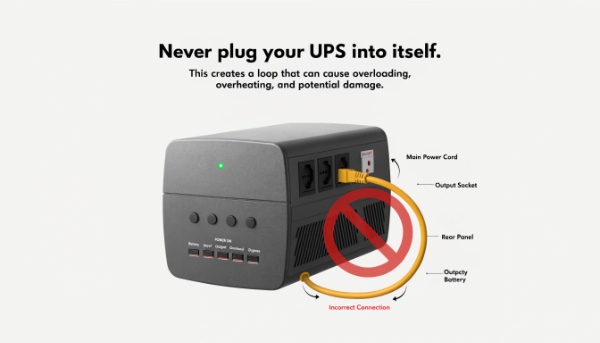
The Inefficiency Loop
This is a fun question my engineers get from time to time. While it seems like you might create infinite power, you're actually creating a recipe for failure. The process of converting power inside a UPS is not 100% efficient.
1. How the Loop Works
When you plug the UPS into itself, it draws power from its own battery. The inverter takes DC power from the battery and converts it to AC power for the outlets. The charger then takes that AC power from the outlet, converts it back to DC power to try and recharge the battery.
2. Why It Fails
Each of those conversions (DC to AC, then AC to DC) loses some energy as heat. It might be 5-10% loss on each step. So, with every "lap" the power takes through this loop, the total amount of energy in the battery goes down. The UPS will quickly detect this as a fault or an overload condition. The fans will spin up, alarms will likely sound, and the unit will shut itself down to prevent damage. It's an interesting thought experiment, but in practice, it's a very bad idea for the health of the equipment.
What is an uninterruptible power supply?
The term "uninterruptible power supply" sounds complex. You know it involves a battery, but you need a simple, clear definition to explain its value and purpose to non-technical colleagues or stakeholders.
An uninterruptible power supply (UPS) is a device that provides immediate, clean, battery-powered energy to your electronics during a power failure. It also shields that same equipment from damaging power surges and voltage fluctuations.
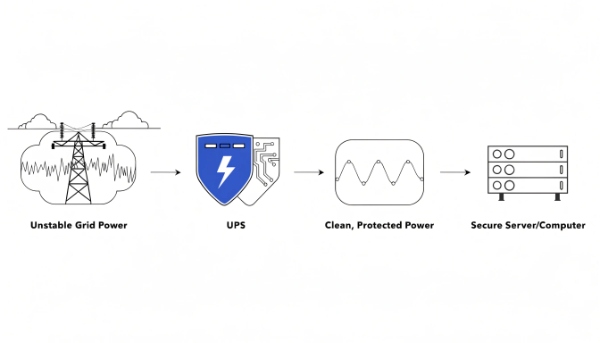
Your Equipment's Personal Bodyguard
I find the best way to explain a UPS is to think of it as a dedicated bodyguard for your valuable electronics. It stands between the chaotic, unpredictable power from the wall outlet and your sensitive, expensive server. It has three very important jobs.
Job 1: Provide Instant Backup Power
This is its most famous job. When a blackout occurs, the UPS instantly switches to its internal battery. The transfer is so fast (zero milliseconds for an Online UPS) that the connected computer or server doesn't even know the main power is gone. This gives you time to shut down safely.
Job 2: Absorb Dangerous Surges
A UPS is also a very advanced surge protector. It can absorb the massive, sudden voltage spikes caused by lightning or grid problems. The UPS sacrifices itself to protect the thousands of dollars of equipment plugged into it.
Job 3: Filter and Clean "Dirty" Power
Utility power is not always a perfect, smooth wave. It has small sags, swells, and electrical noise. A UPS filters this "dirty" power, providing a stable and clean signal. This reduces stress on the internal components of your electronics, helping them last longer.
How do you buy and use an uninterruptible power supply?
You have approval to purchase a UPS for a new project. You are now faced with a wall of technical specifications and models, and you need a simple process to make the right choice.
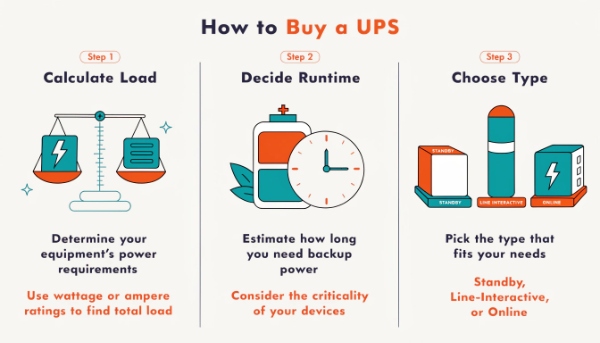
To buy a UPS, first, calculate your total power load (in Watts). Second, decide on the required backup runtime (in minutes). Finally, choose the UPS type (Standby, Line-Interactive, or Online) that matches your equipment's needs.
A Practical Guide for Procurement
As a manufacturer, I help clients navigate this process every day. We can break it down into a simple checklist for buying, followed by a few key rules for using it correctly.
The Buying Checklist
- Size Your Load: Make a list of every device you will plug into the UPS. Find the wattage for each device (it's on the power label) and add them all together. I always recommend adding a 20-25% buffer for future growth. If your total is 750W, look for a UPS rated for at least 1000W / 1500VA.
- Define Your Runtime: How long do you need power during an outage? Just 5 minutes to shut down a server? Or 30 minutes to keep a network running until a generator kicks in? This will determine how big of a battery you need.
- Match the Technology: Choose the right type. For a basic office PC, a simple Standby UPS is fine. For a business server or network gear, a Line-Interactive model is a great balance. For critical medical equipment or a data center, you must use an Online UPS1.
Simple Rules for Usage
- Don't Overload It: Never plug in devices that exceed 80% of the UPS's rated Watt capacity.
- Protect the Right Things: Use it for computers, servers, and networking gear. Do NOT plug in high-draw devices like laser printers, copiers, or space heaters.
- Test It Regularly: Once a quarter, run the UPS's self-test function or unplug it from the wall to ensure the battery is healthy and holds a charge.
Conclusion
An Online UPS creates perfect, isolated power for critical systems. The unit itself lasts over a decade, but its runtime depends on battery capacity, which needs periodic replacement.
-
Explore this link to understand the benefits and functionality of an Online UPS for critical systems. ↩
