
You need to buy a UPS for a critical project, but the options are overwhelming. Choosing the wrong one could lead to system failure, budget overruns, and a damaged professional reputation.
To choose the right UPS, you must first calculate your total power load in Watts, decide on the required backup runtime, and then select the appropriate UPS topology (Standby, Line-Interactive, or Online) that matches your equipment's sensitivity.
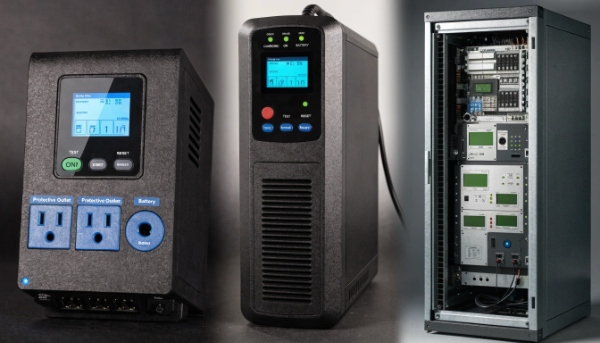
As an OEM/ODM manufacturer, I work with procurement managers like you every day. I know that buying a UPS isn't just about picking a box off a shelf; it's about engineering a reliable power solution for a specific project. The key insight I always share is to start with your project's unique requirements. Do you need specific certifications? Are you dealing with harsh power environments? Answering these questions first is crucial. From there, we can determine if a standard unit works or if you need a custom-designed solution, something my team specializes in.
What Key Factors Define a UPS Buying Guide?
You're creating a purchasing plan for UPS systems across your organization. Without a clear guide, different departments might buy incompatible or inadequate units, creating a support nightmare and wasting money.
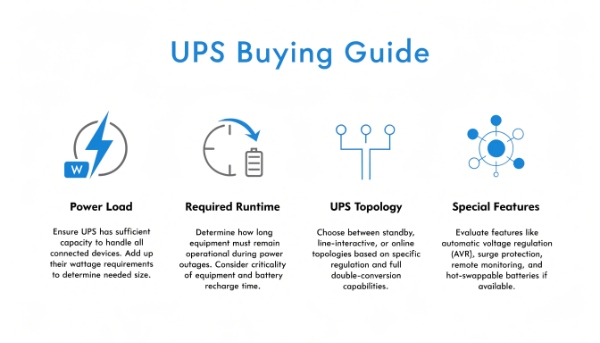
A solid UPS buying guide must define four key factors: the total power load (VA/Watts), required runtime in minutes, the necessary UPS topology for the equipment, and any special management or environmental features.
A Procurement Manager's Step-by-Step Guide
I've helped many system integrators and procurement managers develop internal buying standards. A structured approach saves time and prevents costly mistakes. Think of it as a simple, four-step process to ensure you get the right unit every time. It's the same process we use internally when designing a new solution for a client.
Step 1: Assess Your Power Load
First, you need to know how much power your equipment uses. Make a list of every device you want to protect with the UPS. Look at the power rating (in Watts or Amps/Volts) on the back of each device and add them all up. I always recommend adding a 20-25% buffer for future growth. So, if your total load is 800W, you should look for a UPS that can handle at least 1000W.
Step 2: Determine Required Runtime
Next, ask yourself: what needs to happen during a power outage? Do you just need five minutes to shut down a server gracefully? Or do you need 30 minutes to keep a communications network online until a generator starts? The amount of runtime you need will directly impact the size and cost of the UPS battery.
Step 3: Match the Topology to the Application
This is the most technical part, but it's crucial. The type of UPS determines the level of protection. I'll cover this more in the next section, but for now, know that sensitive servers need a different type of UPS than a simple desktop PC.
Step 4: Consider Special Features
Finally, think about usability. Do you need remote management via a network card? Do you need specific outlets? Does the unit need to operate in a high-temperature environment? These features can be customized, especially when working with an ODM partner like us.
What Are the Different Types of UPS Systems?
You know you need a UPS, but see terms like "Standby," "Line-Interactive," and "Online." Choosing the wrong type could mean you've overpaid for protection you don't need, or worse, under-protected your critical equipment.
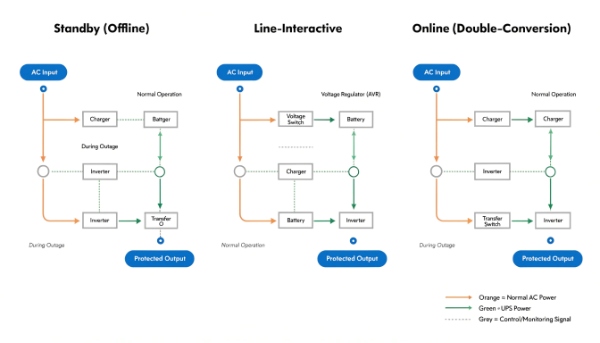
There are three main types of UPS systems: Standby (Offline) for basic protection, Line-Interactive for better voltage regulation, and Online (Double-Conversion) for the ultimate protection of sensitive, critical equipment.
Choosing the Right Level of Protection
I often tell my clients to think of these three types as good, better, and best. The right choice depends entirely on how valuable and sensitive your equipment is. You wouldn't use the same lock on a garden shed that you use on a bank vault. The same logic applies here.
The Three Topologies
Let's break down what each type does and where you should use it. This is fundamental knowledge for anyone sourcing power solutions.
| UPS Type | How it Works | Best For |
|---|---|---|
| Standby (Offline) | Sits idle and switches to battery power in a few milliseconds when it detects a problem. It's the simplest and most affordable type. | Basic desktop computers, printers, and non-critical peripherals in areas with relatively stable power. |
| Line-Interactive | Actively "boosts" or "bucks" the voltage to correct minor power fluctuations (brownouts, sags) without using the battery. It only switches to the battery for a full blackout. | Workstations, small servers, and network equipment. It's the most popular choice for business and home office use due to its balance of cost and performance. |
| Online (Double-Conversion) | Constantly converts incoming AC power to DC and then back to perfect AC power. The protected equipment never touches raw utility power, providing total isolation. | Critical servers, data centers, hospital equipment, and any sensitive electronics that cannot tolerate even the slightest power interruption or fluctuation. |
As a manufacturer, we build all three types. For most of our clients in data centers and healthcare, we almost exclusively recommend Online Double-Conversion systems because the cost of failure is just too high to risk anything less.
How Important is the Battery in a UPS Backup System?
You're comparing two UPS units with the same power rating, but one is much more expensive. The difference is often the battery technology inside, but you're unsure if it's worth the extra cost for your project.
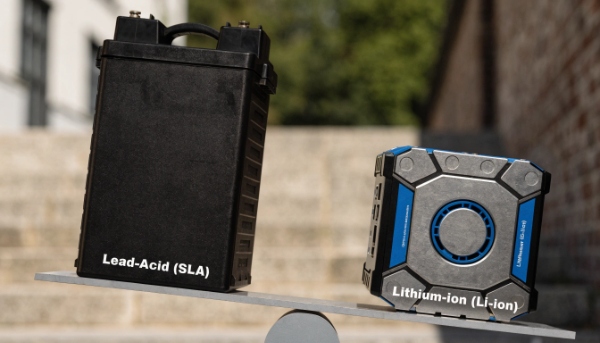
The battery is the most critical component. Its chemistry (Lead-Acid vs. Lithium-ion) and quality determine the UPS's runtime, lifespan, and overall reliability. A failing battery means you have zero backup protection.
The Heart of the Machine: Lead-Acid vs. Lithium-ion
For years, the standard for UPS systems has been the Sealed Lead-Acid (SLA) battery. It's a proven, reliable, and cost-effective technology. We have produced hundreds of thousands of units with these batteries. They are the workhorse of the industry.
However, technology has moved forward. Now, many of our clients are specifically requesting UPS systems with Lithium-ion (Li-ion) batteries. My company has invested heavily in developing patented technology around lithium solutions because we see it as the future of uninterruptible power.
Let's compare them directly so you can make an informed decision for your next project.
| Feature | Sealed Lead-Acid (SLA) | Lithium-ion (Li-ion) |
|---|---|---|
| Lifespan | 3-5 years | 8-10+ years |
| Weight & Size | Heavy and bulky | Up to 60% lighter and smaller |
| Maintenance | Requires frequent replacement | "Set it and forget it" for most of its life |
| Upfront Cost | Lower | Higher |
| Total Cost of Ownership | Higher (due to replacements) | Lower (over the system's life) |
| Recharge Time | Slower (typically 8-10 hours) | Faster (can reach 90% in 2-4 hours) |
A few years ago, I worked with a procurement manager for a chain of retail stores. They were replacing the lead-acid batteries in their server room UPSs every three years. The labor costs and shipping for the heavy batteries were becoming a major operational expense. We designed a custom lithium-ion UPS solution for them. The upfront cost was higher, but they won't have to touch those batteries again for a decade. The total cost of ownership was cut in half.
What Exactly Is an Uninterruptible Power Supply?
You hear the term "UPS" and know it's a battery backup. But you don't understand how it actually works, which makes it difficult to justify the cost or explain its value to non-technical stakeholders.
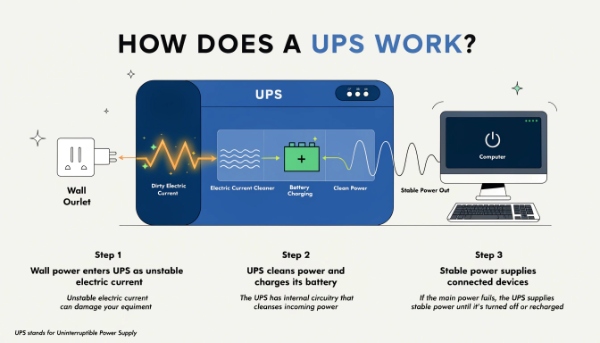
An uninterruptible power supply is a device that provides clean, consistent power to your electronics. It uses an internal battery to supply instant power during an outage and protects against damaging power surges.
More Than Just a Battery
Thinking of a UPS as just a battery is a common oversimplification. It's actually an intelligent system with several key parts working together to protect your equipment. As a manufacturer, we spend a lot of time perfecting how these components interact.
Let’s look under the hood. A typical UPS has four primary jobs, handled by four main components:
1. The Charger (or Rectifier)
This part takes the incoming AC power from your wall outlet and converts it into DC power. Its main job is to keep the internal battery fully charged and ready to go. In an Online UPS, this component is working 100% of the time.
2. The Battery
This is the heart of the UPS. It stores the DC power from the charger. The size and quality of the battery determine how long the UPS can power your equipment during a blackout. It's the single most important component for reliability.
3. The Inverter
When the power goes out, the inverter does the opposite job of the charger. It takes the DC power from the battery and converts it back into clean AC power that your computer and other electronics can use. The quality of the inverter determines the quality of the power (e.g., pure sine wave1).
4. The Automatic Transfer Switch2
This is the brain. It constantly monitors the incoming utility power. The instant it detects a problem—like a blackout or a severe voltage drop—it switches the power source from the wall outlet to the inverter and battery. This transfer happens in just a few milliseconds, so fast that your computer doesn't even notice.
Conclusion
To select the right UPS, follow a guide: assess your load, runtime, and topology needs. Understand that the battery is the critical core, with lithium offering a lower total cost.
