
Your critical equipment is plugged into a UPS1, but do you know how it works? This confusion can lead to choosing the wrong device, leaving you unexpectedly powerless.
A UPS has two power sources. It primarily uses AC power2 from the wall to run your devices and charge its internal battery. During a power outage, it instantly switches to its internal battery as the power source.
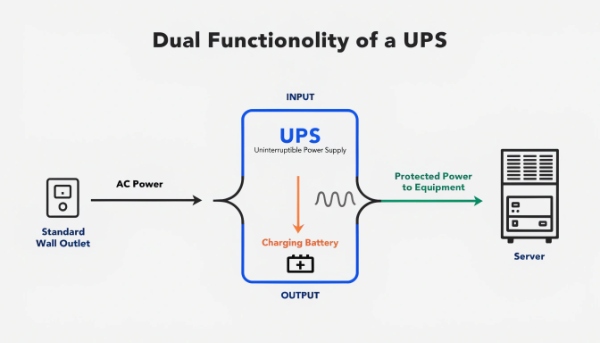
In my ten years of manufacturing UPS systems, I've seen that many people think of a UPS as just a "battery box." This isn't quite right. It's a complete power management system3 that actively filters and stabilizes electricity before it ever reaches your equipment. The battery is just one part of that system, a silent partner waiting for its moment to take over. Understanding this dual-source nature is the key to appreciating what a UPS really does and why choosing the right one is so important for your business.
How Do You Find the Best Uninterruptible Power Supply (UPS) for Your Needs?
The market is flooded with UPS models and technical jargon. Choosing the wrong one means you either overspend on features you don't need or get inadequate protection.
The "best" UPS depends on your equipment. A basic Standby UPS works for a PC. A Line-Interactive UPS4S](https://www.youtube.com/watch?v=BzTbyP9JM4A)[^1] is better for servers and network gear. Critical systems like in data centers or hospitals require an Online Double-Conversion UPS5.
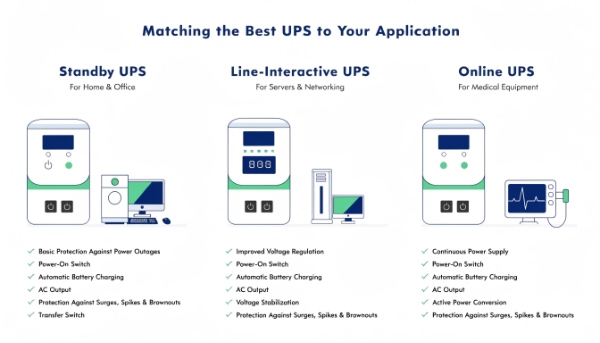
Matching the Technology to the Task
Choosing the right UPS isn't about finding the most powerful one; it's about finding the one with the right technology for the job. We manufacture all three types because each one solves a different problem for our clients. The key is to match the sensitivity of your equipment to the level of protection offered.
Here's a simple breakdown of the three main types:
| UPS Type | How It Works | Best For |
|---|---|---|
| Standby (Offline) | Senses a power problem and switches to battery power. The simplest type. | Basic desktop PCs, non-critical peripherals, and home office equipment. |
| Line-Interactive | Actively corrects minor power fluctuations (brownouts6, sags) without using the battery. | Business workstations, servers, and network closets. |
| Online (Double-Conversion) | Constantly rebuilds the power from the battery. Your equipment never touches raw grid power. | Data centers, medical equipment, and any truly critical infrastructure7. |
I remember a new procurement manager for a regional bank who was about to order simple Standby units for their branch servers to save money. We had to explain that a bank's servers are constantly processing transactions. Even a millisecond switch-over time from a Standby UPS could corrupt data. They needed the constant, perfect power from an Online UPS. Choosing the right type is not just a technical detail; it's a critical business decision.
What Are the Core Components Inside a UPS System?
A UPS looks like a simple box from the outside. Not knowing what's inside makes it difficult to understand quality differences or why one model costs more than another.
Every UPS system has four core components: a rectifier to convert AC to DC, the battery to store DC power, an inverter8 to convert DC back to clean AC, and a bypass switch9 for maintenance or internal faults.
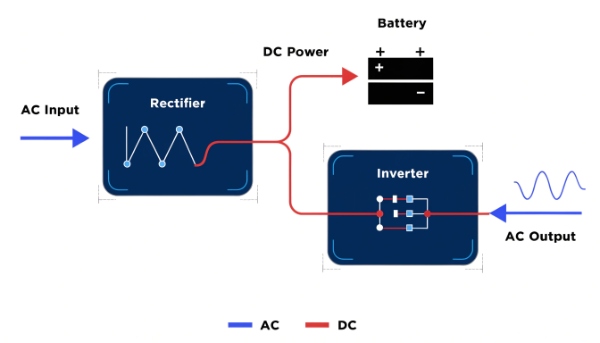
A Look Inside the Box
As a manufacturer, we live and breathe these components. The quality of each part directly impacts the reliability and performance of the final product. Understanding these four parts helps you appreciate what you're really buying.
The Rectifier: The Power Gateway
When you plug the UPS into the wall, the electricity first goes through the rectifier. Its job is simple but important: it converts the alternating current (AC) from the outlet into direct current (DC). This DC power is then used to charge the battery and power the inverter in an Online UPS.
The Battery: The Energy Reservoir
This is the part everyone knows. The battery stores the DC power from the rectifier10, waiting for a power outage. The size and quality of the battery determine how long your equipment will stay running when the power goes out. This is a key area where we offer both lead-acid and advanced lithium solutions.
The Inverter: The Power Rebuilder
The inverter is the heart of a modern UPS. It takes the DC power from the battery (or rectifier) and converts it back into clean, stable AC power for your equipment. The quality of the inverter determines the quality of the power your sensitive electronics receive. A high-quality inverter produces a perfect sine wave, which is essential for delicate equipment.
The Bypass Switch: The Failsafe
The bypass switch is a safety feature. It allows power to flow directly from the wall to your equipment, bypassing all the internal components. This is used for maintenance or in the rare case of an internal UPS fault, ensuring your equipment can stay running no matter what.
What's the Real Difference Between a Surge Protector, a Power Strip, and a UPS?
People often use these terms as if they mean the same thing. Plugging a critical server into a basic power strip thinking it's protected can lead to catastrophic data loss.
A power strip is just an extension cord. A surge protector11 adds protection against power spikes. A UPS provides surge protection and battery backup power during a complete outage, offering the highest level of protection.
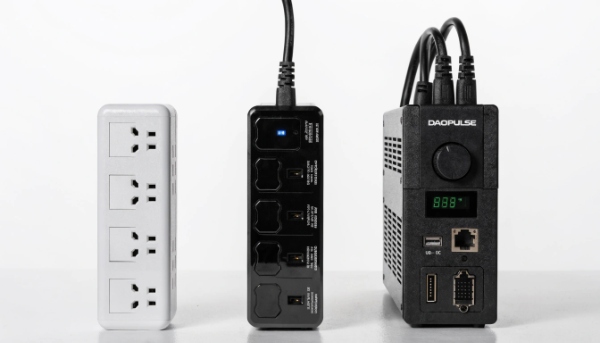
Three Levels of Protection
I always stress this point with new clients: you must understand the job each of these devices performs. My insight is that the function of a UPS is far greater than that of a surge protector or power strip because only a UPS can provide backup power. They are not interchangeable.
Here is a clear comparison of what they do:
| Device | Adds Extra Outlets | Surge Protection | Battery Backup |
|---|---|---|---|
| Power Strip | Yes | No | No |
| Surge Protector | Yes | Yes | No |
| UPS | Yes | Yes | Yes |
A power strip12 simply turns one wall outlet into many. It offers zero protection. A surge protector adds a crucial layer of defense against voltage spikes, like those from a nearby lightning strike. It absorbs the excess energy. A UPS does everything a surge protector does, but it also contains a battery. When the power goes out completely, the battery takes over, giving you time to save your work and shut down your equipment safely. For any business-critical device, a UPS is the only acceptable choice.
Why Do You Need Battery Backup if You Already Have a Surge Protector?
You bought a good surge protector and believe your electronics are safe. A brief power flicker or brownout happens, and suddenly your computers restart, and you lose unsaved data.
A surge protector only defends against voltage spikes. It offers zero protection against voltage sags, brownouts, or blackouts. For these common problems, you need the battery backup and power conditioning provided by a UPS.
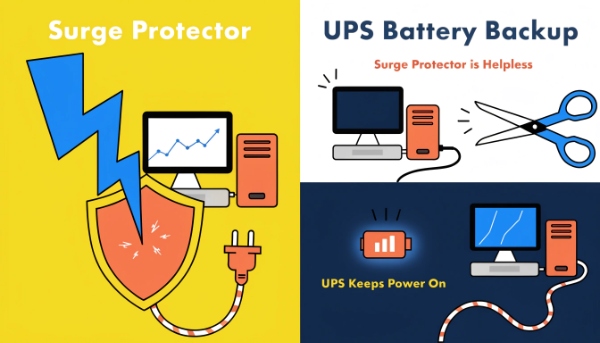
Power Problems a Surge Protector Can't Solve
A surge protector11 is a one-trick pony. It does its one job very well, but it's useless against the most common types of power problems that can harm your equipment.
Power Sags and Brownouts
These are short-term drops in voltage. They can happen when large equipment nearby turns on. This low voltage can stress power supplies, causing crashes, data corruption, and long-term damage to electronic components. A surge protector does nothing to help. A Line-Interactive or Online UPS, however, will boost the voltage back to a safe level instantly.
Blackouts
This is a complete loss of power. A surge protector is just a piece of plastic during a blackout. A UPS, on the other hand, immediately switches to its battery, allowing your operations to continue or giving you the time needed for a graceful shutdown. This is the primary function of a UPS.
I once worked with a small design firm that lost an entire day's work because of a 10-second blackout. They had all their workstations on expensive surge protectors, but it didn't matter. The power went out, the computers shut off, and the unsaved files were gone. They called us the next day to order a UPS for every single desk.
Conclusion
A UPS is a complete power solution, not just a battery. Its internal parts provide surge protection and clean power. Understanding this helps you choose the right device to truly protect your critical equipment.
-
Understanding UPS systems is crucial for ensuring your equipment is protected during power outages. ↩
-
Learn about AC power's role in UPS systems to better understand how they function. ↩
-
Explore the broader context of power management systems and the role of UPS within them. ↩
-
Explore the advantages of Line-Interactive UPS systems for business workstations and servers. ↩
-
Understand why critical systems require an Online Double-Conversion UPS for optimal protection. ↩
-
Learn how a UPS can safeguard your devices from the damaging effects of brownouts. ↩
-
Understand the importance of UPS systems in protecting critical infrastructure from power issues. ↩
-
Discover the inverter's role in converting DC back to AC power for your equipment. ↩
-
Understand the importance of the bypass switch for maintenance and safety in UPS systems. ↩
-
Learn how the rectifier converts AC to DC power, a key process in UPS operation. ↩
-
Clarify the distinctions between surge protectors and UPS systems for better equipment protection. ↩ ↩
-
Learn why a power strip is insufficient for protecting critical electronics compared to a UPS. ↩
