
You are responsible for a data center. One minute of downtime could cost millions. Choosing the wrong UPS is not an option, but the technical specifications are complex and overwhelming.
To choose a data center UPS, you must select an Online Double-Conversion system for maximum protection. Then, calculate your total power load, determine your required runtime, and plan for future growth with a scalable, modular design.

The role of a UPS in a data center is absolutely critical. It is the first and last line of defense against power problems that could cripple an entire organization. Unlike a simple desktop UPS, a facility-level system requires a deeper level of planning. It’s not just about keeping the lights on; it's about providing perfectly clean, stable power 100% of the time. As an OEM manufacturer, we guide system integrators through this process every day. Let's break down the key considerations to ensure your data center's power is truly uninterruptible.
What's So Special About a Data Center UPS?
You see a desktop UPS and a massive data center UPS. You know one is bigger, but what really makes them different? Why can't you just use a bunch of smaller ones?
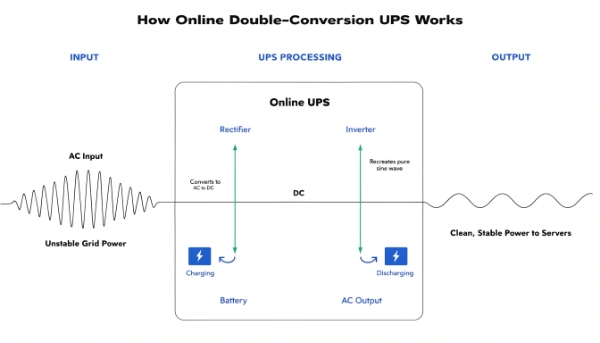
A data center UPS is fundamentally different because it uses Online Double-Conversion technology. This isolates equipment from raw utility power completely. It is also designed for scalability and redundancy (N+1) to eliminate single points of failure.
From Basic Backup to Total Isolation
The key difference is the level of protection. A desktop UPS is like a bodyguard who only jumps in when there's a big, obvious threat like a blackout. A data center UPS is like a secure bio-lab, where everything coming in is decontaminated and reconstructed before it can enter the clean room. This "reconstruction" of power is called double-conversion. It takes messy utility AC power, converts it to clean DC power, and then converts it back to perfect AC power for your servers. This process happens continuously, so your critical equipment never touches the unstable grid power. This eliminates even the tiniest sags, surges, or frequency variations that can cause mysterious IT glitches.
| Feature | Standard Desktop UPS | Data Center UPS |
|---|---|---|
| Technology | Standby or Line-Interactive | Online Double-Conversion |
| Transfer Time | 4-8 milliseconds | Zero (0 ms) |
| Scalability | Fixed Capacity | Modular (Add power as you grow) |
| Redundancy | None (Single point of failure) | N+1, N+2 (Built-in fault tolerance) |
| Management | Basic USB/Serial | Advanced Network Management |
For a facility where every second of uptime counts, only an Online Double-Conversion system provides the necessary level of assurance.
When should you replace the battery in your UPS system?
Your data center UPS is three years old. It seems to work fine during self-tests. Is it safe to wait for an alarm, or are you risking a catastrophic failure by delaying replacement?
You should proactively replace UPS batteries every 3-5 years, regardless of their condition. You must replace them immediately if the UPS displays a "replace battery" alarm, fails a self-test, or shows signs of low voltage.

An Investment, Not an Expense
This is a point I cannot stress enough with procurement managers. As the insight says, you must replace batteries on time to avoid a much greater loss. Waiting for a battery to fail is like waiting for your car's brakes to give out on the highway. The cost of a planned battery replacement is tiny compared to the cost of an unexpected data center outage. The standard VRLA (Valve-Regulated Lead-Acid) batteries used in most large systems have a design life of 3-5 years under ideal conditions. Pushing them beyond this is a gamble. We have seen entire facilities go down because one old battery in a string failed, causing a cascading shutdown. Proactive replacement is the only responsible maintenance strategy.
| Warning Sign | What It Means | Recommended Action |
|---|---|---|
| Exceeds 3-5 Year Lifespan | The battery's internal chemistry is degrading and becoming unreliable. | Schedule immediate, proactive replacement. |
| "Replace Battery" Alarm | The UPS has detected a critical fault, such as low voltage or high internal resistance. | Replace immediately. Your system is unprotected. |
| Failed Self-Test | The battery could not sustain the load even for a few seconds. | Replace immediately. |
| Swelling or Leaking Case | The battery has failed catastrophically and is a safety hazard. | Decommission the unit safely and replace it. |
Can I connect a UPS to an inverter for an extended backup?
You need several hours of runtime, far more than any standard UPS can provide. You wonder if you can connect your UPS to a separate, larger inverter and battery bank to create a custom long-running solution.
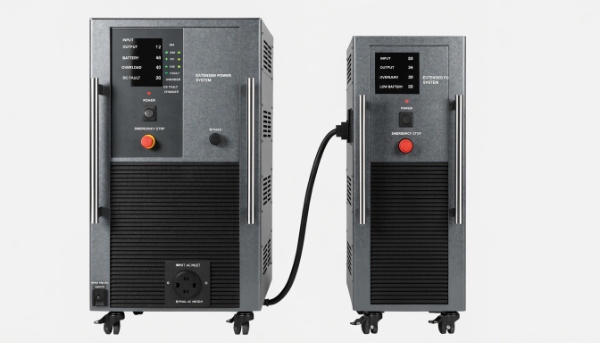
While a UPS contains an inverter, you cannot simply connect it to another one. To extend runtime, you connect manufacturer-approved External Battery Modules (EBMs) directly to the UPS, ensuring compatibility and safety.
The Right Way to Add More Runtime
This question comes from a smart line of thinking: how to build a bigger system. The insight that a UPS can be connected to extend its function is correct, but the method is specific. A UPS is a highly integrated system. Its internal inverter, charger, and battery management system are all designed to work together perfectly. Introducing a third-party inverter would create conflicts and would not work. The proper way to add runtime is by using EBMs. These are essentially cabinets full of batteries that are designed to plug directly into the UPS. The UPS will automatically detect them and add their capacity to its total runtime calculation. This is a safe, scalable, and warranty-approved method. For one of our hospital clients, we designed a system with a 100kVA UPS and a string of ten EBMs to provide over two hours of runtime for their critical imaging equipment. This modular approach allows you to buy the runtime you need today and add more later if your needs change.
How much battery backup runtime does the UPS provide?
You are looking at a 10kVA UPS. How do you know if it will run your 5,000-watt server rack for 10 minutes or 60 minutes? The VA rating alone doesn't give you the answer.
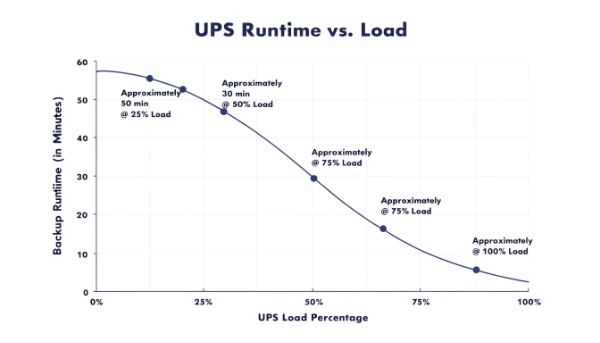
The runtime depends on two factors: the size of your load (in Watts) and the capacity of the batteries (in Amp-hours). A lower load will result in a much longer runtime on the same set of batteries.
It's All About Load vs. Capacity
This is the most fundamental calculation in sizing a UPS. As my insight states, backup time is decided by the load and the battery capacity. Think of it like this: the battery is your fuel tank, and your IT equipment is the engine. A small engine running at low speed can run for a very long time on a full tank. A big engine running at full throttle will empty that same tank very quickly. It's the same with a UPS. A UPS supporting a 25% load might run for an hour, but that same UPS supporting a 90% load might only last for five minutes. Every reputable manufacturer provides a runtime chart or calculator for their UPS models. You should always use this as your guide.
Here is a sample runtime table for a hypothetical 10,000 VA / 9,000 Watt UPS:
| Load (Watts) | Load Percentage | Estimated Runtime |
|---|---|---|
| 9,000 W | 100% | 5 Minutes |
| 6,000 W | 67% | 12 Minutes |
| 4,500 W | 50% | 20 Minutes |
| 2,250 W | 25% | 50 Minutes |
This is why just buying a big VA rating isn't enough. You must match the UPS and its battery capacity to your specific load to get the runtime you actually need.
Conclusion
Choose an Online UPS for your data center, replace batteries proactively every 3-5 years, use EBMs to extend runtime, and always check the runtime chart for your specific load.
