
Wondering where a UPS gets its energy? It seems like magic, but depending on a device that can also lose power feels risky and confusing for your infrastructure plans.
A UPS has two power sources. Its primary source is the AC power from a wall outlet, which it uses to run and charge its battery. Its secondary source is its own internal battery, which it uses during a power outage.
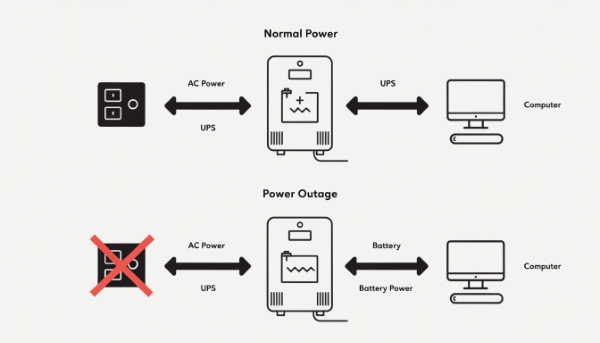
In my decade of manufacturing UPS systems, I've found that this simple question is key to understanding what a UPS really does. It's a bridge. It uses wall power when available, but its real job is to use its own stored power the instant the wall power disappears. The insight I share with all my clients is this: Choosing the right UPS1 is very important. You need to match it to the size and type of your equipment. For example, devices with motors, precision instruments, or medical equipment all have different needs. A larger load needs a larger UPS. A UPS provides strong protection for your entire power infrastructure.
What is the difference between an SMPS and a UPS2?
You hear about SMPS and UPS, and they both deal with power. This creates confusion, making it hard to know if you have the right protection or if you are missing a critical component.
An SMPS (Switch-Mode Power Supply) converts AC power to DC power for a single device to use. A UPS provides backup battery power to keep a device running during an outage. Your computer has an SMPS inside it; the UPS is a separate, external box.
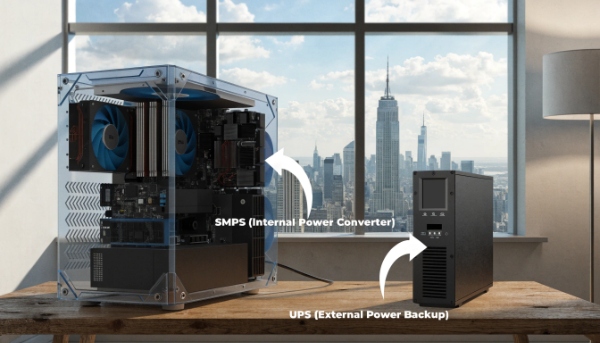
Understanding Power Roles
This is a technical point that often trips up even experienced procurement managers. They serve two completely different but related functions. I always explain it by saying one is a converter, and the other is a protector. An SMPS is what allows your computer to use the power from the wall. A UPS makes sure that power is clean and never gets interrupted.
Here's a breakdown of their roles:
| Feature | SMPS (Switch-Mode Power Supply) | UPS (Uninterruptible Power Supply) |
|---|---|---|
| Main Job | Converts power from AC to DC. | Backs up and conditions AC power. |
| Location | Inside your electronic device (e.g., PC). | External device, between the wall and your equipment. |
| Function | Allows the device to operate. | Protects the device from power problems. |
| Battery? | No | Yes |
Every modern electronic device, from your laptop to a data center server, has an SMPS. It’s a standard, internal component. A UPS, however, is an external piece of infrastructure you add to provide an extra layer of safety. It protects the SMPS and the entire device from dirty power and outages. As an OEM/ODM manufacturer, we create the complete UPS system that ensures the SMPS inside our clients' equipment always gets the clean, stable power it needs to function.
How to select the proper UPS for your devices?
Choosing a UPS feels like a gamble. With so many options, you worry about buying a unit that is too weak to protect your gear or so powerful that you've wasted your budget.
To select the right UPS, you must first calculate the total power consumption (in Watts) of your devices. Then, decide how much backup runtime you need and consider the type of equipment you are protecting.
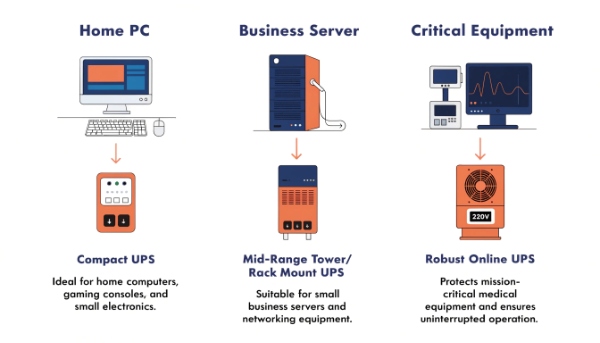
A Step-by-Step Guide to a Perfect Match
Selecting a UPS is a core part of my job when helping clients like system integrators. It's a science, not a guess. Following a clear process ensures you get exactly what you need.
Step 1: Calculate Your Load
First, add up the total power consumption, in Watts, of every device you want to protect. You can usually find this on the device's power label. It is critical to add a buffer. I recommend choosing a UPS where your total load is no more than 80% of the UPS's capacity.
Step 2: Consider the Load Type
This is where expert knowledge comes in. As my experience shows, the type of load is just as important as the size.
- Standard Loads: PCs and servers are straightforward.
- Inductive Loads: Equipment with motors, like pumps or fans, creates a power surge on startup. They require a UPS with a higher VA rating to handle this "inrush" current.
- Precision Loads: Medical equipment or scientific instruments need the cleanest power possible. For these, an Online Double-Conversion UPS is the only safe choice. It completely rebuilds the power, providing perfect, stable energy.
| Load Type | Example | Recommended UPS Type |
|---|---|---|
| Resistive | PC, Server | Standby, Line-Interactive |
| Inductive | Motor, Pump, Laser Printer | Line-Interactive, Online |
| Precision | Medical Scanner, Lab Gear | Online (Double-Conversion) |
How long does an uninterruptible power supply last?
You invested in a UPS for long-term security. But you worry the unit itself might fail silently, leaving you with a false sense of security and vulnerable equipment when an outage finally happens.
A UPS unit can last for 10 or more years with proper care. However, its internal batteries have a shorter lifespan of 3-5 years for lead-acid models and must be replaced regularly to ensure it works.

The Two Lifespans of Your UPS
When clients ask me this question, I always clarify that we are talking about two different things: the electronic system and the consumable battery. Thinking of them separately is key to managing your power infrastructure correctly.
The UPS hardware itself—the circuitry, the inverter, the housing—is built to last. Our units are designed for a service life of over a decade. They are solid, reliable pieces of equipment.
The battery, on the other hand, is a chemical component that naturally degrades over time. Its lifespan is the most critical factor for UPS reliability.
- Sealed Lead-Acid (SLA) Batteries: These are the industry standard. They are cost-effective and reliable, with a typical lifespan of 3 to 5 years. Heat is their biggest enemy; every 10°C increase in operating temperature above 25°C can cut the battery's life in half.
- Lithium-ion Batteries: This is a more modern solution we provide. While the initial cost is higher, they last 8 to 10 years, are lighter, and perform better at higher temperatures. They offer a lower total cost of ownership over the life of the UPS.
Most UPS systems have a self-test feature that will alert you when the battery is weak. It's vital to heed these warnings and plan for battery replacement.
What is an uninterruptible power supply?
The term "uninterruptible power supply" sounds complex and intimidating. This can make people overlook this essential device, thinking it's only for giant data centers and not for their business.
An uninterruptible power supply (UPS) is simply a device that provides instant, clean battery power to your electronics the moment your main power fails. It acts as a bridge, preventing any interruption.
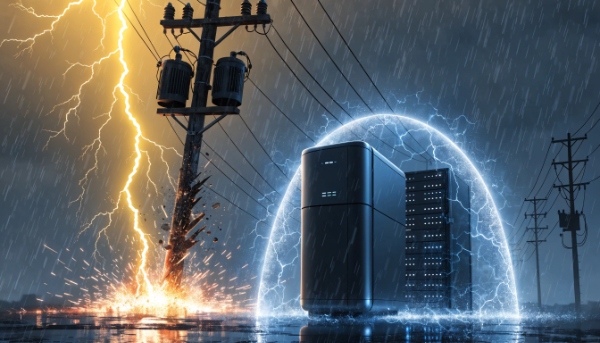
Your Personal Power Guardian
Let's break it down to its most basic purpose. I often tell my clients to think of a UPS as a bodyguard for their electronics. It stands guard 24/7, watching the power that comes from the wall. Most of the time, the power is fine, and the UPS just lets it pass through while keeping its own battery charged and ready.
But the moment it detects a problem—a complete blackout, a sag in voltage (a brownout), or a sudden spike—it jumps into action. Instantly, in a matter of milliseconds, it disconnects your equipment from the problematic utility line and switches to its own clean, perfect power from its internal battery. This transition is so seamless and fast that your computer or server doesn't even know it happened. It just keeps running as if nothing is wrong. This gives you precious time to save your work and shut down safely, or for your backup generators to kick in. It's not just a battery; it's an intelligent power manager that guarantees your operations are truly uninterruptible.
Conclusion
A UPS uses wall power to charge its battery, providing instant, clean power during an outage. Selecting the right one based on load and device type is key to its effectiveness.
