
You carry your expensive laptop everywhere you go. But plugging it into an unknown outlet at a cafe or hotel feels risky. Are you protected, or is a power surge waiting to fry it?
No, laptops do not strictly need a separate surge protector. The AC adapter, the black "brick" that comes with your laptop, already has surge protection built into it. However, using one adds an extra, inexpensive layer of defense.
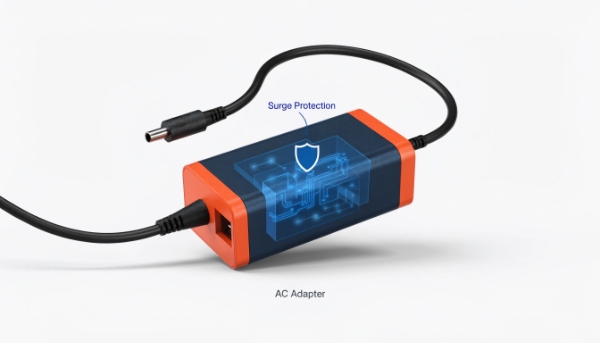
In my decade of building power protection solutions, I've found that people are right to be cautious. The AC adapter provides a good first line of defense, but it is not a foolproof guarantee against a powerful surge. The insight I always share with my clients is this: for truly valuable electronics like high-end computers, a full uninterruptible power supply (UPS) is the best solution. You can even connect multiple UPSs in parallel for the ultimate protection against any kind of failure, whether it's from the power grid or the protection device itself.
Do modern laptops and computers need surge protectors?
You just bought a state-of-the-art PC. You assume its modern power supply is invincible, but a thunderstorm rolls in and you feel a sense of dread. Is your expensive new hardware really safe?
Yes, it is highly recommended. While modern computer power supplies have good internal protection, they are not immune to strong surges from lightning or grid faults. A dedicated surge protector or UPS is cheap insurance for your expensive hardware.

The Layered Protection Strategy
This is a topic I discuss frequently with system integrators. A modern power supply unit (PSU) in a desktop or the AC adapter for a laptop is a sophisticated piece of engineering. It's designed to handle a wide range of voltages and has internal components, like Metal Oxide Varistors (MOVs), to clamp minor power surges. This is the first line of defense.
However, these internal components have their limits. A very strong surge, like from a nearby lightning strike, can easily overwhelm them. Also, these internal MOVs degrade a little bit with every surge they absorb. Over time, they can wear out completely, leaving you with no protection at all. You won't know they have failed until your computer suddenly dies.
That is why a layered approach is the professional standard.
| Protection Level | Device | What it Protects Against |
|---|---|---|
| Basic (Level 1) | Internal PSU/Adapter | Minor voltage fluctuations, small internal surges. |
| Good (Level 2) | External Surge Protector | Stronger external surges, electrical line noise. |
| Best (Level 3) | Uninterruptible Power Supply (UPS) | Surges, blackouts, brownouts, and electrical noise. |
A dedicated surge protector or UPS acts as a strong outer shield. It takes the big hits from the outside world. This protects the more delicate internal protection circuits inside your computer, ensuring everything lasts longer and stays safe.
Can you daisy chain two or more UPSs together?
You need more outlets or longer backup time. You have an extra UPS lying around. Plugging one into the other seems like a simple solution, but you hesitate, sensing this might be a dangerous idea.
No, you should never daisy-chain UPS systems by plugging one into another. This practice is dangerous, can overload and damage both units, creates a fire hazard, and will void your warranty.
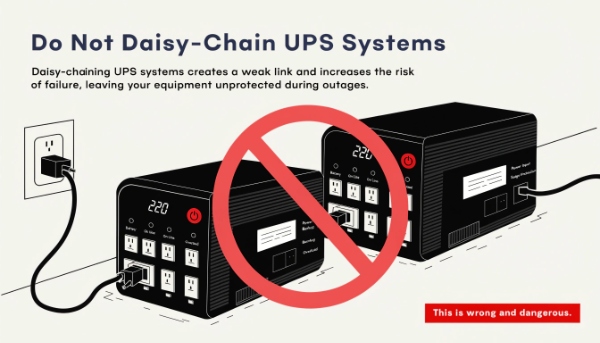
The Right Way and the Wrong Way
This is a serious safety issue. I've seen clients consider this, and I always stop them immediately. It's one of the most common and dangerous mistakes people make with power protection.
Here's why daisy-chaining is so bad. First, the output of a consumer UPS on battery is often a "simulated sine wave." This is a choppy, blocky form of AC power. It's okay for running a computer, but it's terrible for the charging circuit of another UPS. It can cause the second UPS to overheat or fail. Second, the first UPS is not designed to handle the power draw of a second UPS trying to charge its battery while also supporting a load. This can cause an overload that shuts everything down.
The correct way to get more power or redundancy is to use UPS models specifically designed for it. For critical client projects, we use "parallel-capable" UPS systems. These units are built to be linked together with a special communication cable. They work as a team, perfectly sharing the load. If one UPS fails for any reason, the other one instantly takes over 100% of the load. This provides true N+1 redundancy, the gold standard for protecting critical systems.
What UPS is okay for a 600W build computer?
You spent weeks picking parts for your 600W PC build. Now you need a UPS, but the specs are confusing. Buying the wrong one could mean it fails right when you need it most.
For a 600W computer, you should get a UPS with a capacity of at least 1000VA / 750W. This provides a safe 20-25% power buffer and ensures the UPS can handle the full load without being strained.
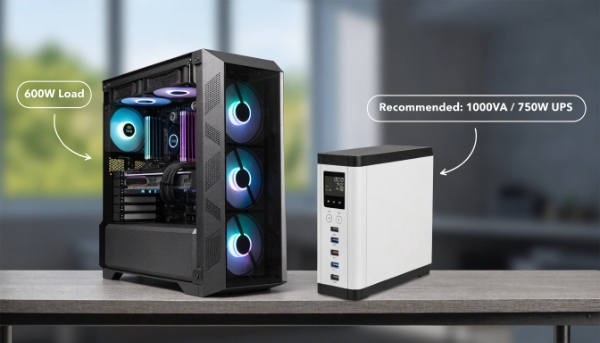
Calculating Your Needs Correctly
Helping clients size a UPS is a core part of my job. Here’s the simple process I walk them through.
First, you need to understand the two power ratings on a UPS: Watts (W) and Volt-Amps (VA). Watts is the "real power" your computer uses. VA is the "apparent power" the UPS can provide. Because of how power supplies work, the VA number is always higher than the Watt number.
A good rule of thumb I always recommend is the 80% rule. Your total load should never be more than 80% of the UPS's rated Watt capacity. This prevents the UPS from being over-stressed, which helps it last longer and perform more reliably.
For your 600W computer, the calculation is simple:
600W / 0.80 = 750W
You need a UPS with a Watt rating of at least 750W. When you look at models, this will typically correspond to a unit rated at 1000VA or 1500VA. For a high-performance computer with an expensive power supply, I also strongly recommend a UPS with a "Pure Sine Wave" output. This provides cleaner, higher-quality power that is much better for your sensitive components.
How to protect my expensive electronics from power surges?
You own expensive TVs, sound systems, and computers. A single lightning storm could destroy thousands of dollars in an instant. This constant worry takes away the enjoyment of your devices.
The best protection is a layered approach. Use a whole-house surge protector at your electrical panel, plug devices into point-of-use surge protectors, and use a UPS for your most critical equipment.
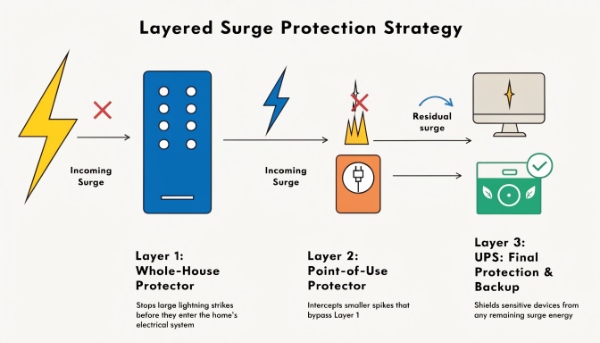
A Three-Layer Defense System
To provide complete protection for our clients' facilities, we always recommend a comprehensive, multi-layer strategy. You can apply the same logic at home.
Layer 1: The Main Shield (Whole-House)
This is your first and strongest line of defense. A whole-house surge protector1 is a device installed by an electrician right at your main electrical panel. Its job is to stop massive power surges from external sources, like a lightning strike, before they can even enter your home’s wiring. This protects everything connected to your electrical system, including large appliances like your air conditioner and refrigerator.
Layer 2: The Local Guard (Point-of-Use)
Even with a whole-house unit, smaller surges can be generated inside your house. For example, when a large motor in your furnace or AC unit kicks on, it can create a small surge on the line. A quality power strip with surge protection2 provides a second barrier right at the outlet. This is perfect for protecting a cluster of devices, like your TV and sound system. Look for a high Joule rating, as this indicates how much energy it can absorb.
Layer 3: The Ultimate Guardian (The UPS)
For your most critical and valuable electronics—your computer, network gear, and external drives—the UPS is the final and most complete layer of protection. A UPS does more than just stop surges. It actively filters the power, cleaning up electrical noise. Most importantly, it provides battery backup, which protects against sags, brownouts, and blackouts that can corrupt data and damage hardware just as easily as a surge.
Conclusion
Laptops have built-in protection, but a UPS is best for expensive computers. Never daisy-chain UPSs; instead, choose a correctly sized unit and use a layered strategy for total home protection.
