
Your UPS just saved your work during an outage. Now you're wondering if it's a one-time use device. Do you have to replace the expensive battery every single time the power goes out?
Yes, a UPS battery is designed to be automatically recharged. Once utility power is restored, the UPS's internal charger will begin replenishing the battery, preparing it for the next power event. No manual intervention is needed.
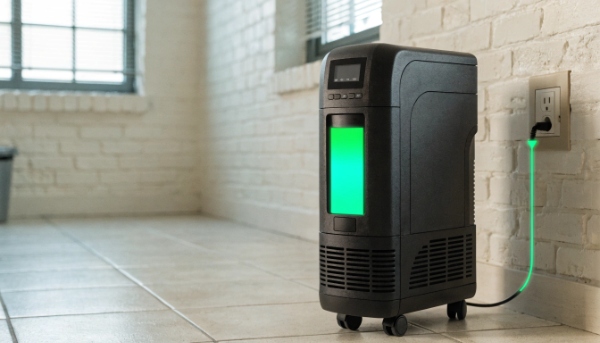
In my 10 years of manufacturing UPS systems, I've found it helpful to explain a UPS as a smart, automated robot dedicated to power protection. It's not just a simple battery. When the power is on, it's intelligently charging and maintaining its battery. When the power fails, it instantly switches to battery power. When there's a fault, it alerts you. This automatic, self-managing nature is what makes it such a critical tool for our clients in hospitals and data centers. It's a system you can rely on to work on its own.
How can I add an external battery to a UPS to increase runtime?
A standard UPS gives you ten minutes of runtime, but your project requires an hour. Buying a much larger UPS seems like overkill and is too expensive. Is there a more efficient way?
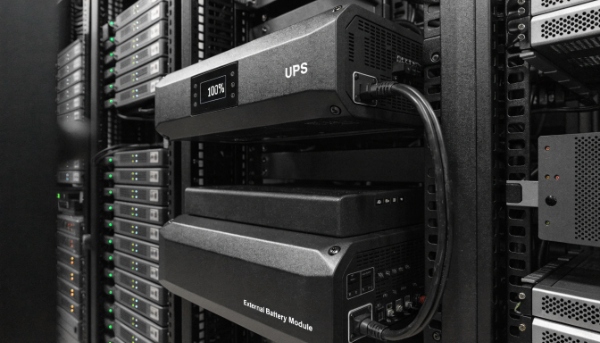
You can increase runtime by connecting an External Battery Module (EBM), also called an External Battery Pack (EBP), to a UPS that has a dedicated connector for it. Not all UPS models support this feature.
Scaling Your Power Solution
This is a very common requirement from our system integrator clients. They often need to balance performance with budget and physical space. The solution is modularity. Many professional-grade UPS models are designed with a special port on the back, specifically for connecting EBMs.
An EBM is essentially a case full of batteries that matches the UPS. You can "daisy-chain" several EBMs together to get very long runtimes. This approach has several advantages over just buying a single, oversized UPS.
| Feature | Buying a Larger UPS | Adding an EBM |
|---|---|---|
| Cost | High upfront cost for a bigger power capacity you may not need. | Lower initial cost. Pay only for the extended runtime you need. |
| Scalability | Not scalable. You are stuck with the runtime of the single unit. | Highly scalable. You can add more EBMs later as your needs grow. |
| Installation | Can be heavy and difficult to install. May require new wiring. | EBMs are simpler to add on. They use a simple plug-and-play connector. |
| Customization | Limited to standard models. | As an OEM/ODM, we can design custom battery solutions to meet specific runtime or space requirements for large projects. |
When a client comes to me with a specific runtime target, say 90 minutes for a critical network closet, we first select a UPS that can handle the power load (in Watts). Then, we calculate how many EBMs are needed to meet the 90-minute goal. This ensures the client gets a perfectly tailored, cost-effective solution.
What is the difference between a UPS and a battery backup?
You see the terms "UPS" and "battery backup" used interchangeably. This creates confusion when you're trying to source a product for a critical system. Are they the same thing, or is there a vital difference?
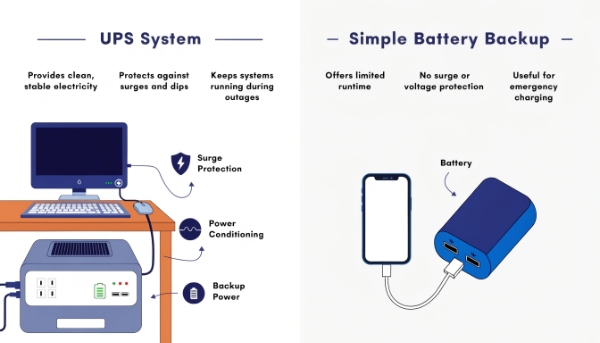
"Battery backup" is a function, not a device. A UPS is a complete system that provides battery backup, but also offers crucial surge protection and power conditioning. A simple power bank is technically a battery backup, but it is not a UPS.
It's a System, Not Just a Spare Tank
I often clarify this point for procurement managers. Thinking of a UPS as just a "battery backup" is like thinking of a car as just a "gas tank." The tank is essential, but it doesn't do anything without the engine, the electronics, and the wheels. A UPS is a complete power management system.
A simple "battery backup," like a USB power bank, only does one thing: it stores power. A UPS does three critical jobs to protect high-value equipment.
The Three Core Functions of a UPS
-
Ensures Power Continuity (The Battery Backup Function): This is the most obvious job. When utility power fails completely (a blackout), the UPS instantly switches to its internal battery, preventing your equipment from shutting down. This gives you time to save your work and perform a graceful shutdown.
-
Provides Power Protection (The Surge Protector Function): A UPS is also a high-end surge protector. It shields your connected electronics from damaging power surges and voltage spikes, like those from lightning strikes or grid switching. This protection is far more robust than what you find in a basic power strip.
-
Offers Power Conditioning (The Power Quality Function): This is the feature that separates a good UPS from a simple battery. The utility power coming from your wall is rarely perfect. It can have minor sags, swells, and electrical noise. A UPS (especially Line-Interactive and Online models) cleans and conditions this "dirty" power, providing a stable and pure electrical signal to your sensitive electronics, which helps them last longer.
What is the purpose of a UPS (uninterruptible power supply)?
Your IT department insists on putting a UPS on every server. It's a significant expense, and you wonder if it's really necessary. What does this box actually do that's so important?
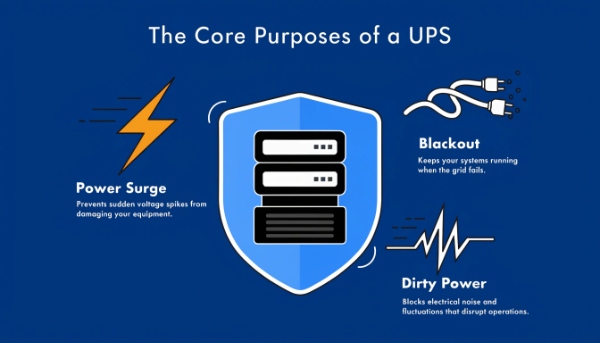
The primary purpose of a UPS is to provide a clean, stable, and continuous flow of power to critical equipment, protecting it from power outages, surges, and other electrical disturbances that can cause data loss, corruption, and hardware damage.
The Guardian of Your Digital Assets
A UPS serves one main purpose: to create a safe and stable power environment where your critical systems can operate without risk. For our clients in finance and healthcare, the cost of even a few seconds of downtime can be catastrophic. A UPS is their insurance policy against that disaster.
Let's think back to the "robot" analogy. The purpose of this power robot is to handle three specific threats to your equipment.
Threat 1: The Sudden Stop (Blackouts)
The most well-known threat is a complete loss of power. A UPS provides a bridge of battery power, allowing systems to continue running or shut down properly. A sudden power loss to a server can corrupt its operating system or database, leading to hours or days of recovery work.
Threat 2: The Violent Jolt (Surges and Spikes)
A power surge from a lightning strike can be like a physical hammer blow to delicate microelectronics. A UPS absorbs this jolt, sacrificing its own internal components to protect the far more expensive equipment plugged into it. This single function can save thousands of dollars in hardware replacement costs.
Threat 3: The Slow Poison (Brownouts and Noise)
This is the most subtle threat. Inconsistent power, with frequent voltage sags (brownouts) and electrical noise, puts constant stress on a computer's power supply. This stress can cause premature failure of components. A UPS acts as a filter, smoothing out these imperfections and feeding your equipment a clean, steady diet of electricity, extending its operational life.
What are the different types of UPS used in the market?
You're trying to choose a UPS. You see "Standby," "Line-Interactive," and "Online," and the prices are very different. You need to know which type is appropriate for your project without overspending.
The three main types of UPS are Standby (or Offline), Line-Interactive, and Online (or Double-Conversion). They offer increasing levels of protection, with Standby being the most basic and Online providing the most complete isolation from power problems.
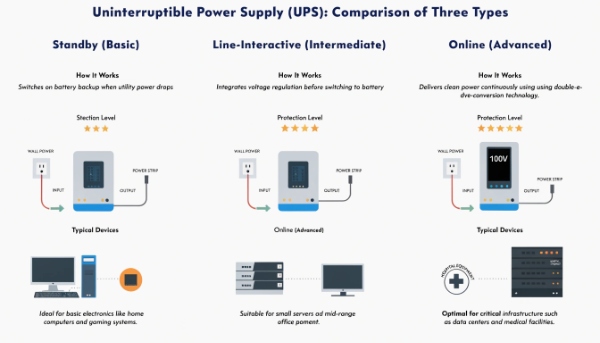
Matching the Technology to the Need
As an OEM, we manufacture solutions across this spectrum because different applications have different needs. Selecting the right type is the most important technical decision you'll make in the procurement process. Let's look at what defines each one.
| UPS Type | Protection Level | How It Works | Typical Application |
|---|---|---|---|
| Standby / Offline | Basic | The simplest form. It passes utility power directly to the load. During an outage, it quickly switches (in milliseconds) to its internal battery. | Desktop PCs, printers, and other non-critical electronics in areas with generally stable power. |
| Line-Interactive | Intermediate | Includes a transformer that corrects minor voltage fluctuations (sags and swells) without using the battery. It provides good protection and efficiency. | Departmental servers, network closets, and workstations. This is the most common type used in business environments. |
| Online / Double-Conversion | Advanced | The ultimate in protection. It constantly regenerates the power, completely isolating the equipment from the utility supply. There is zero transfer time to the battery. | Critical data centers, medical equipment (like in hospitals), and sensitive scientific instruments that require perfect power. |
For our most demanding clients, such as those building hospital infrastructure, we almost always provide Online Double-Conversion systems. The equipment they are protecting is too valuable and sensitive to risk anything less than a perfectly stable, regenerated power source.
Conclusion
A UPS battery recharges automatically. You can add external batteries for more runtime. It's a complete system, not just a battery, providing crucial protection against all power problems.
